
PDF extraction
Generate PDFs in Code with okra exec (Codemode)
okra exec runs sandboxed JavaScript that composes okra's render engines — designed templates, ReportLab, HTML to PDF, and merge — and returns one PDF.
Most of okraPDF is about reading documents — parsing a PDF into tables, text, and bounding boxes an agent can trust. okra exec is the other direction: you send code, okra runs it in a sandbox, and you get a PDF back.
It is the answer to a question that keeps coming up once an agent can read documents: can it also write one? An invoice from a row of data, a branded report from a JSON blob, a cover page stitched onto an HTML body. You do not want to ship a headless-Chromium container, a ReportLab install, and a PDF-merge step for every one of those. You want to describe the document in code and get bytes.
That is what exec (internally, “codemode”) does. This post is a tour of what it can do, with examples that were run against api.okrapdf.com while writing it.
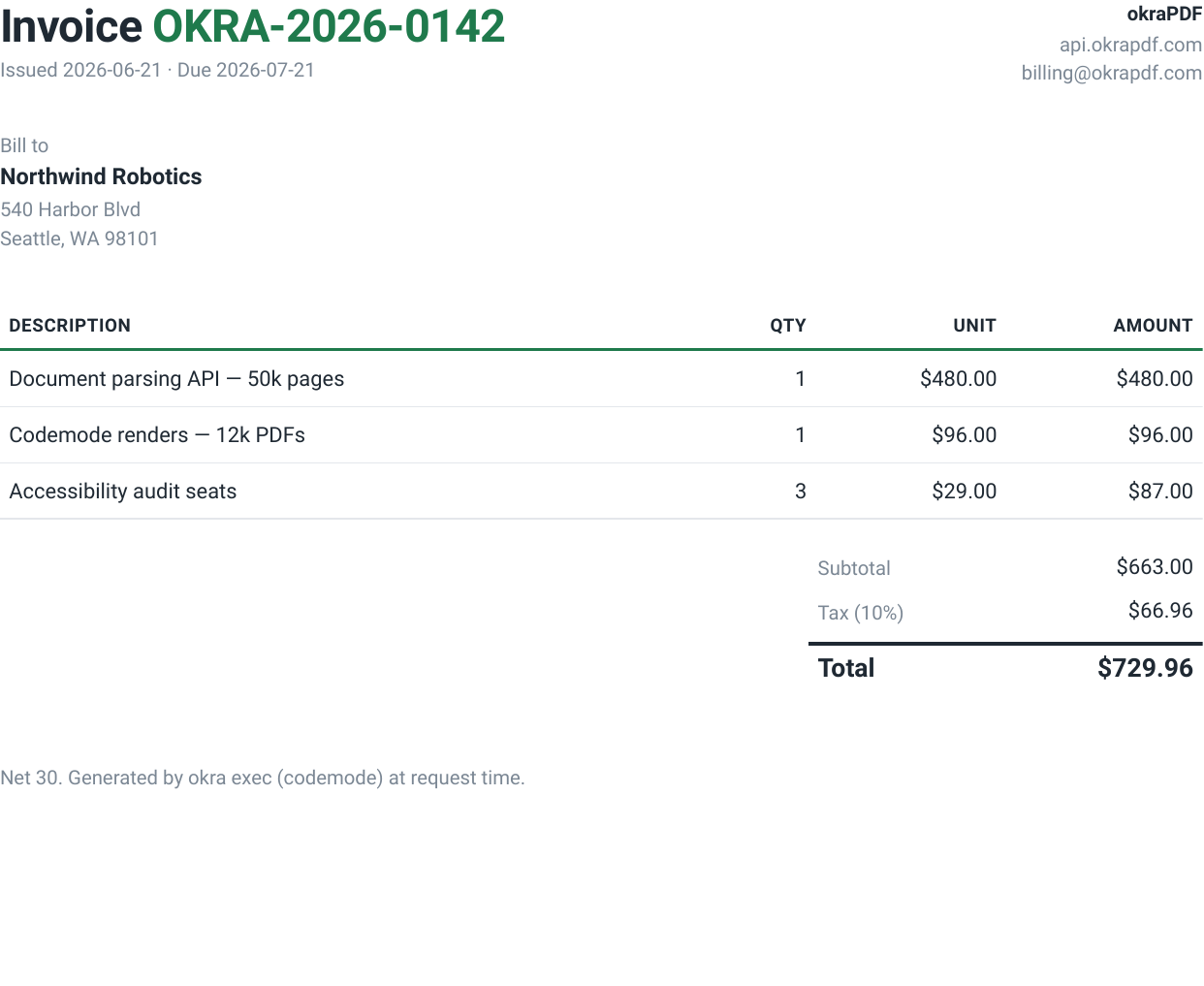
Table of Contents
- What okra exec is
- The contract
- The host functions
- Example 1: Hello, PDF
- Example 2: A data-driven invoice
- Example 3: Compose engines with pdf.merge
- Example 4: A designed report from a typed spec
- Example 5: Publish with provenance
- The sandbox
- Calling it from the CLI
- Where okraPDF fits
What okra exec is
exec is one mode of the POST /v1/renders endpoint. You give it a small JavaScript module; okra loads it into a per-request sandbox with a handful of PDF host functions injected, runs your default export, and returns whatever PDF you assembled.
The point is composition. okra ships several render engines — a designed-template system, ReportLab, headless-Chromium HTML to PDF, and a PDF merger. In exec, those become functions you call from ordinary code, in any order, in a single round trip. No temp files, no second request, no infrastructure on your side.
The contract
Your code is an ES module with a default (or main) async export. It receives one argument — { pdf, browser, input } — and returns an object with a base64 PDF:
export default async function ({ pdf, browser, input }) {
  // ...compose a PDF using the host functions...
  return { pdfBase64 };
}pdfandbrowserare the injected host functions (below).inputis whatever JSON you sent in the request body’sinputfield.- The return value’s
pdfBase64becomes the response body.
The host functions
Every host function returns { pdfBase64, size }, so the output of one is the input to the next.
| Function | What it does |
|---|---|
pdf.render(spec) | Render a designed PDF spec — okra’s template system (report, resume, magazine, poster, and ~11 more types). |
pdf.reportLab({ script, files }) | Run a ReportLab Python script for pixel-precise tables, charts, and typography. |
pdf.merge([pdfBase64, ...]) | Concatenate two or more PDFs into one. |
browser.htmlToPdf({ html, width?, height? }) | Print an HTML string to PDF with headless Chromium. |
Example 1: Hello, PDF
The smallest useful thing: an HTML string to a PDF.
export default async function ({ browser }) {
  const { pdfBase64, size } = await browser.htmlToPdf({
    html: `<!doctype html><html><body style="font-family:sans-serif;padding:48px">
      <h1>okra exec — it lives</h1>
      <p>Rendered by codemode at request time.</p>
    </body></html>`,
  });
  return { pdfBase64, size };
}
Send it:
curl -sS https://api.okrapdf.com/v1/renders?format=pdf \
  -H "Authorization: Bearer $OKRA_API_KEY" \
  -H "Content-Type: application/json" \
  -d "$(jq -n --arg code "$(cat hello.js)" '{mode:"exec", code:$code}')" \
  -o hello.pdf
That returns a one-page PDF. The response carries the metadata in headers — X-Okra-Render-Id, X-Okra-Pdf-Sha256, X-Okra-Pdf-Size — so you can log a content hash for every render.
Example 2: A data-driven invoice
The input field is where exec earns its keep. Post structured data; let the code turn it into a document. Here the code reads an invoice payload, builds an HTML table, computes the totals, and prints it:
export default async function ({ browser, input }) {
  const inv = input ?? {};
  const items = inv.items ?? [];
  const rows = items.map((it) => `<tr>
      <td>${it.desc}</td>
      <td class="num">${it.qty}</td>
      <td class="num">$${it.price.toFixed(2)}</td>
      <td class="num">$${(it.qty * it.price).toFixed(2)}</td>
    </tr>`).join("");
  const subtotal = items.reduce((s, it) => s + it.qty * it.price, 0);
  const tax = subtotal * (inv.taxRate ?? 0);
  const total = subtotal + tax;
  const html = `<!doctype html><html><head><meta charset="utf-8"><style>
    body{font-family:-apple-system,Segoe UI,Roboto,sans-serif;color:#1f2933;padding:56px}
    .accent{color:#1F7A4C}
    table{width:100%;border-collapse:collapse;margin-top:32px;font-size:14px}
    th{text-align:left;border-bottom:2px solid #1F7A4C;padding:8px 6px;text-transform:uppercase}
    td{padding:10px 6px;border-bottom:1px solid #e4e7eb}
    .num{text-align:right;font-variant-numeric:tabular-nums}
  </style></head><body>
    <h1>Invoice <span class="accent">${inv.number ?? ""}</span></h1>
    <table><thead><tr><th>Description</th><th class="num">Qty</th>
      <th class="num">Unit</th><th class="num">Amount</th></tr></thead>
      <tbody>${rows}</tbody></table>
    <p style="margin-top:24px;text-align:right">
      Subtotal $${subtotal.toFixed(2)} · Tax $${tax.toFixed(2)} ·
      <strong>Total $${total.toFixed(2)}</strong></p>
  </body></html>`;
  return await browser.htmlToPdf({ html });
}
The request carries the data alongside the code:
curl -sS https://api.okrapdf.com/v1/renders?format=pdf \
  -H "Authorization: Bearer $OKRA_API_KEY" -H "Content-Type: application/json" \
  -d "$(jq -n --arg code "$(cat invoice.js)" --argjson input "$(cat invoice.json)" \
        '{mode:"exec", code:$code, input:$input}')" \
  -o invoice.pdf
The figure at the top of this post is exactly this — a 26 KB, one-page PDF generated from a JSON payload, with the line items and the $663.00 → $729.96 math all computed inside the sandbox.
Example 3: Compose engines with pdf.merge
This is the part you cannot do with a single HTML-to-PDF service. Render a branded cover with okra’s template system, render the body as HTML, and stitch them together — all in one run:
export default async function ({ pdf, browser, input }) {
  // 1) Cover via okra's designed templates.
  const cover = await pdf.render({
    title: input?.title ?? "Q2 Field Report",
    subtitle: "Generated by okra exec",
    type: "poster",
    author: "okraPDF",
    content: [{ type: "body", text: "Cover rendered by pdf.render()." }],
  });
  // 2) Body via headless Chromium.
  const body = await browser.htmlToPdf({
    html: `<body style="font-family:Georgia,serif;padding:64px;line-height:1.6">
      <h2 style="color:#1F7A4C">Findings</h2>
      <p>This page came from <code>browser.htmlToPdf()</code> in the same run.</p>
    </body>`,
  });
  // 3) One document.
  const merged = await pdf.merge([cover.pdfBase64, body.pdfBase64]);
  return { pdfBase64: merged.pdfBase64, size: merged.size };
}
Three engines, one HTTP call, a multi-page PDF out. Each engine plays to its strength — templates for the cover, HTML/CSS for flowing content, ReportLab when you need exact numeric tables — and pdf.merge makes them one document.
Example 4: A designed report from a typed spec
If you do not want to write HTML or Python at all, pdf.render takes a typed spec and applies okra’s design system. The agent supplies data; okra owns the layout:
export default async function ({ pdf, input }) {
  const d = input ?? {};
  return await pdf.render({
    title: d.title ?? "Parser Benchmark",
    subtitle: "Reading-order accuracy vs. latency",
    type: "report",
    author: "okraPDF",
    content: [
      { type: "h2", text: "Summary" },
      { type: "callout", text: d.summary },
      { type: "bullet", text: "okra: highest reading-order accuracy" },
      { type: "h2", text: "Detail" },
      { type: "table",
        headers: ["Engine", "tau-b", "Latency (s/pp)"],
        rows: d.engines.map((e) => [e.name, String(e.tau), String(e.latency)]) },
    ],
  });
}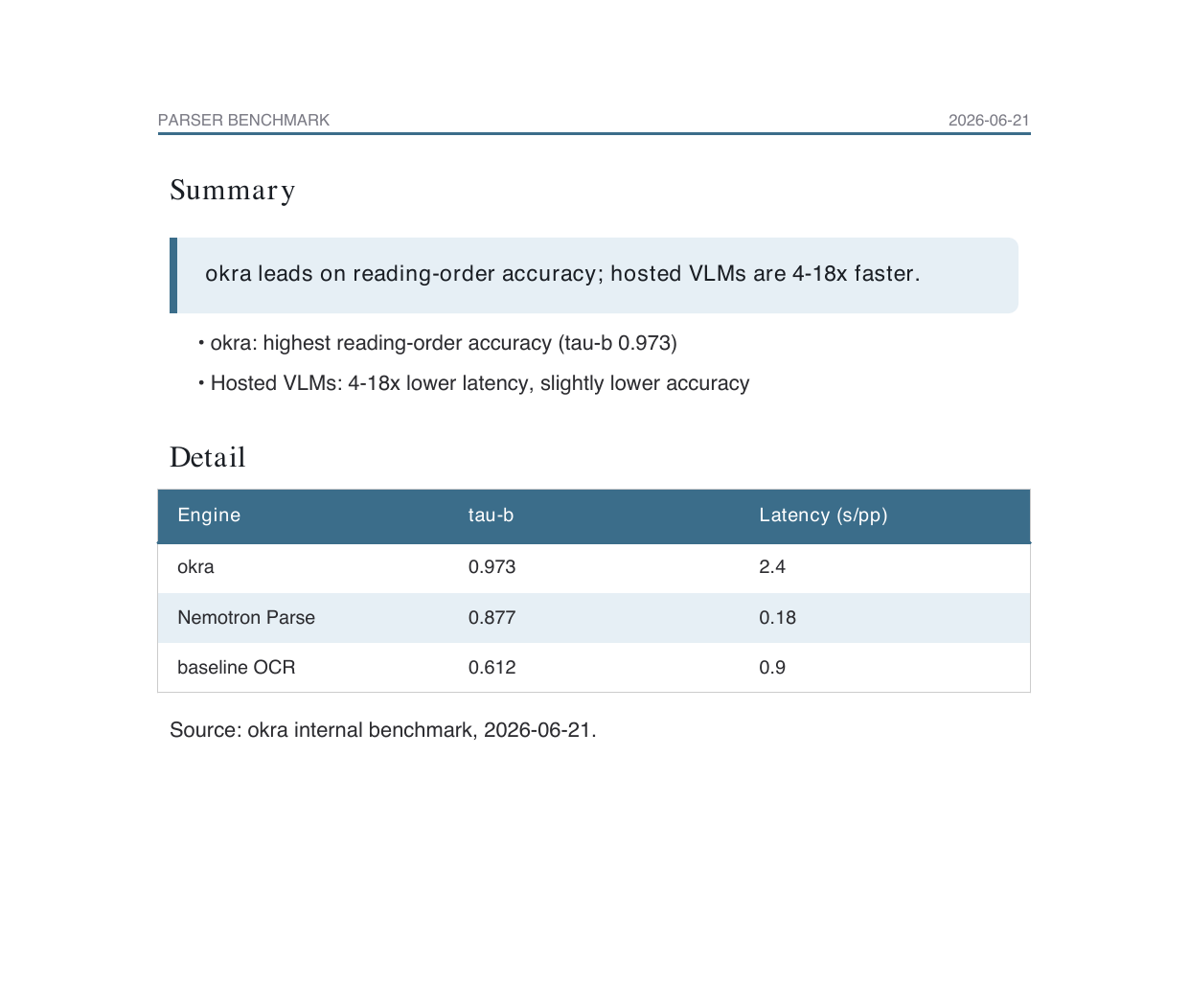
Supported blocks include h1–h3, body, bullet, numbered, callout, table, code, divider, and more, across ~15 document types (report, resume, magazine, poster, academic, and others).
Example 5: Publish with provenance
Add publish to the request and okra persists the PDF and serves it at a stable public URL — plus, optionally, the exact source that produced it:
curl -sS https://api.okrapdf.com/v1/renders \
  -H "Authorization: Bearer $OKRA_API_KEY" -H "Content-Type: application/json" \
  -d "$(jq -n --arg code "$(cat invoice.js)" --argjson input "$(cat invoice.json)" \
        '{mode:"exec", code:$code, input:$input, persist:true,
          publish:{enabled:true, source:{enabled:true, includeInput:true}}}')"
The response returns three URLs — the document, the published PDF, and a /source endpoint that serves the literal code that generated it:
- PDF:
res.okrapdf.com/pdf/upload/v1/doc-rc761bf2acd4648.pdf - Source:
res.okrapdf.com/pdf/upload/v1/doc-rc761bf2acd4648/source
That source link is the whole okraPDF idea pointed at generation instead of parsing: a document you can publish and prove. Anyone can see exactly what code, and what input, produced the bytes.
The sandbox
exec runs your code in a per-request isolate, not a shared server:
- No network egress. The sandbox cannot make outbound requests. Your code can only call the injected
pdfandbrowserhost functions — it cannot fetch a URL, reach a database, or exfiltrate a key. If you need external data in the PDF, pass it ininput. - Bounded. Each run has a timeout (default 60s, set
timeoutMsto lower it) and module-size limits, so a runaway template cannot pin the renderer. - Stateless by default. Without
persist/publish, nothing is stored — the bytes are computed and streamed straight back.
That isolation is what makes it safe to hand a code surface to an autonomous agent. The worst a bad render can do is fail.
Calling it from the CLI
If you would rather not hand-roll curl, the okra CLI wraps the same endpoint:
# A .js/.mjs source runs as codemode — pass --mode exec.
okra render invoice.js --mode exec --input invoice.json --out invoice.pdf

# Persist into your account as a created document.
okra render report.js --mode exec --input data.json --save --out report.pdf
okra render also takes .py (ReportLab), .json (designed spec), and .html directly, so the CLI covers every render mode, not just exec.
Where okraPDF fits
okraPDF is a document layer for agents. The reading side turns a PDF into tables, text, and bounding-box citations an agent can trust. exec is the writing side: a small, sandboxed code surface that turns data into a document — composing template, HTML, ReportLab, and merge engines in one call, with optional published provenance on the way out.
Every example here ran against production while this post was written. If you want to try it, grab an API key and POST /v1/renders with mode: "exec".