
PDF extraction
Local PDF parsing on a MacBook: where ParseBench says we actually are
ParseBench scores for every PDF parser that runs on a 16GB MacBook — Docling, Dots OCR, Qwen 3 VL, MinerU, Chandra — vs hosted APIs, plus a live tracker.
Can a laptop parse PDFs well enough for an agent to act on the output? Not “can it extract some text” — it can, trivially — but can it produce the tables, chart values, and grounded citations that downstream automation needs without silently corrupting them?
ParseBench (arXiv:2604.08538, LlamaIndex, April 2026) is the first benchmark we’ve found that answers that question with data instead of vibes: ~2,000 human-verified enterprise pages, scored on five dimensions — tables, charts, content faithfulness, semantic formatting, and visual grounding. Fourteen methods were evaluated. Exactly three of them can run on a 16GB MacBook.
Disclosure: okraPDF is a document-parsing platform. We don’t sell any of the local parsers below — we care about this data because routing across parsing engines is a core part of our product, and this benchmark is the best public evidence of where each engine class is strong.
The short version
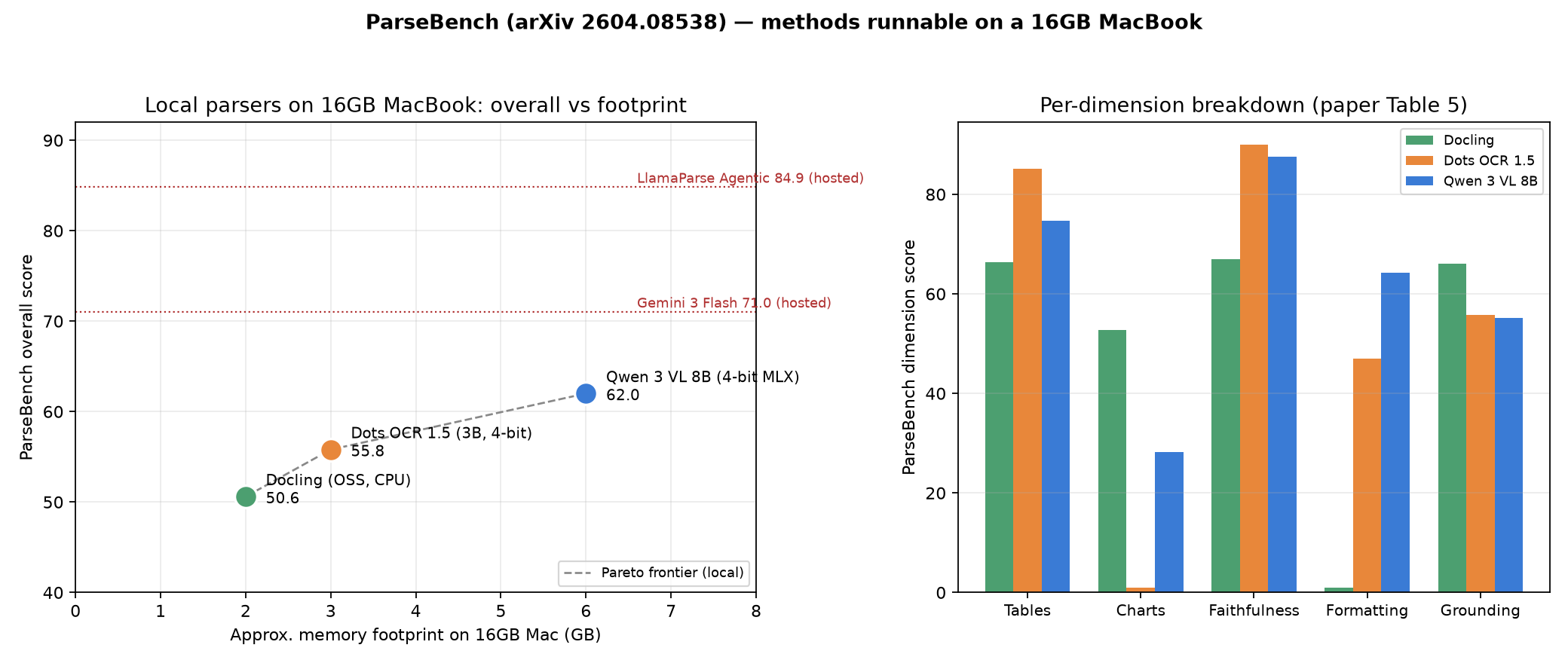
| Parser | Footprint | Overall | Best dimensions | Worst dimensions |
|---|---|---|---|---|
| Docling (OSS) | ~2 GB, CPU | 50.6 | Charts 52.8, grounding 66.1 | Formatting 1.0 |
| Dots OCR 1.5 | ~3 GB (4-bit) | 55.8 | Tables 85.2, faithfulness 90.0 | Charts 0.9 |
| Qwen 3 VL 8B | ~6 GB (4-bit MLX) | 62.0 | Formatting 64.2, best local overall | Charts 28.2 |
Hosted references from the same paper: Gemini 3 Flash 71.0, Reducto 67.8, LlamaParse Agentic 84.88.
The paper-verified local frontier tops out about 9 points below a commodity cloud VLM and 23 below the best agentic pipeline. But the aggregate hides the more useful finding: no single local parser wins more than two dimensions, and the three of them barely overlap in what they’re good at.
The tracker
We maintain an interactive version of this chart — dimension toggle, Pareto frontier, sortable score table, hosted-reference overlay — and update it as new local-runnable parsers and scores land. Since publishing we’ve added two leaderboard entries beyond the paper’s three: MinerU 2.5 (per-dimension scores verified in our own reproduction) and Chandra OCR 2 (overall score only, per-dimension pending):
Open the tracker full-page — or grab the static chart: ParseBench local Pareto chart.
What ParseBench actually measures
Most document benchmarks score text similarity — how close the output string is to a reference. ParseBench scores semantic correctness for agents: whether the parsed output preserves the structure an autonomous system needs to make a correct decision.
- Tables — structural record matching (GTRM): merged cells, hierarchical headers, cross-page continuity. A shifted header is a wrong financial value downstream.
- Charts — exact data-point verification: annotated values must be locatable in the parser’s table output within tolerance. Not a description of the chart — the numbers.
- Content faithfulness — rule-based checks for omissions, hallucinations, and reading-order violations.
- Semantic formatting — strikethrough, superscript, bold, hyperlinks: formatting that changes meaning. A struck-through price is not the current price.
- Visual grounding — every extracted element traced to a bounding box on the page. The auditability requirement in regulated workflows.
The full breakdown is in our earlier post on document parsing for AI agents and in the paper itself.
The three parsers that fit in 16GB
Docling: the grounding and charts specialist
IBM’s open-source Docling pipeline is the lightest entry — a CPU-native assembly of layout models and OCR, no GPU required, no quantization games. Its overall score is the lowest of the three, but the dimension breakdown is startling: charts 52.8 and visual grounding 66.1 are the best local numbers by enormous margins — Dots OCR scores 0.9 on charts, Qwen 28.2.
pip install doclingfrom docling.document_converter import DocumentConverter
result = DocumentConverter().convert("quarterly-report.pdf")
print(result.document.export_to_markdown())The weakness is just as stark: semantic formatting scores 1.0. Docling’s pipeline normalizes styling away, so strikethroughs, superscripts, and bold-as-meaning don’t survive.
If your documents are contracts with struck clauses or financial reports where bold marks totals, Docling alone will quietly lie to your agent.
Dots OCR 1.5: the faithfulness champion
RedNote’s 3B VLM dots.ocr is the smallest model here and posts the single most impressive number in the entire paper: content faithfulness 90.0 — the best score of any method evaluated, hosted or local, including LlamaParse Agentic. Its tables score (85.2) also beats every specialized commercial parser except Azure.
At 4-bit it fits in about 3 GB, runs through the usual MLX/Ollama community builds, and is fast on Apple Silicon. The catch: charts 0.9. It renders charts as descriptive text rather than structured data, so anything that needs “the Q3 bar value” downstream gets nothing. Formatting is middling at 47.0.
Qwen 3 VL 8B: the best local all-rounder
The largest model that still fits — Qwen 3 VL 8B, 8.8B parameters, roughly 6 GB at 4-bit via MLX:
pip install mlx-vlm
python -m mlx_vlm.generate \
  --model mlx-community/Qwen3-VL-8B-Instruct-4bit \
  --image page.png --max-tokens 4096 \
  --prompt "Parse this document page to markdown with layout boxes."
It’s the only local entry with no catastrophic dimension: worst is charts at 28.2, and it owns semantic formatting at 64.2 — nearly double Dots OCR. Overall 62.0 makes it the best single local answer. One caveat from the paper: its grounding score comes from a separate layout pipeline, not the parse pass, so grounding costs you two model calls.
The pattern: specialization, not a hierarchy
Put the three side by side and the “which local parser is best” framing dissolves:
- Need chart data points? Docling, and it’s not close (52.8 vs 0.9 / 28.2).
- Need clean transcription of dense or multi-column text? Dots OCR (90.0 faithfulness).
- Need formatting semantics — struck prices, footnote superscripts, bold totals? Qwen (64.2 vs 47.0 / 1.0).
- Need bounding boxes for citations? Docling (66.1) among the paper’s methods — though leaderboard addition MinerU 2.5 posts 71.5 (see the tracker), with Qwen’s two-pass pipeline behind both.
- Need one model, decent at everything? Qwen.
This is the same fragmented capability landscape the paper reports across hosted systems, reproduced locally. The dimensions where each local parser wins are almost disjoint.
A hybrid that routes tables and text to Dots, charts and grounding to Docling, and formatting-sensitive pages to Qwen would score competitively with hosted single-pass VLMs on four of five dimensions — at zero marginal cost, fully offline, with documents never leaving the machine.
That routing thesis is not hypothetical for us: it’s why okraPDF treats parsing engines as pluggable vendors with per-engine capability profiles instead of a single blessed pipeline, in both the playground and the PDF-to-JSON API.
What’s still out of reach locally
Two gaps remain real:
Charts. The best local number (Docling 52.8) is 25 points below LlamaParse Agentic (78.11). The paper’s explanation is structural: leading systems use agentic loops — parse, self-verify, re-extract — and single-shot models, local or otherwise, plateau around 65. Closing this locally requires orchestration, not a bigger laptop.
The overall ceiling. Local tops out at 62.0. Gemini 3 Flash at its cheap operating point scores 71.0 for roughly a cent a page, and LlamaParse Agentic reaches 84.88 at ~1.2¢.
If your volume is low and documents aren’t sensitive, the hosted options are simply ahead. Local wins on privacy, offline operation, marginal cost at volume, and latency-on-your-hardware — not on raw score. Yet.
The “yet” matters: Chandra OCR 2 (an open 5.3B VLM from Datalab, Qwen 3.5-based, with community MLX quants that fit in roughly 3.5 GB) scores 70.1 overall on the ParseBench leaderboard — above Gemini Flash’s paper number — though its per-dimension breakdown isn’t published yet, and its OpenRAIL-M weights carry commercial-use restrictions the other local parsers don’t. Fine-tuning recipes targeting this exact benchmark already exist for Qwen 3 VL. The local frontier is moving faster than the hosted one right now. We’ll keep the tracker updated as new entries land; the benchmark itself is open — dataset and eval code — so new scores are straightforward to reproduce.
FAQ
- Does quantization change these scores? Probably, slightly. The paper ran Qwen and Dots at BF16 on H100s; a 4-bit MLX build typically costs a point or two on structured tasks. Treat the local numbers as upper bounds, not guarantees.
- What about Marker, MinerU, or olmOCR? MinerU 2.5 now has a leaderboard score we verified in our own reproduction: 45.9 overall — below Docling — despite beating it on tables (71.7) and posting the best local visual-grounding number (71.5), because charts (1.1) and semantic formatting (4.5) collapse. It’s in the tracker and runs on Apple Silicon via the official
vlm-mlx-enginebackend. Marker and olmOCR still have no comparable score; we’ll add them once we or the community run them through the benchmark. - Can I chain these locally without a framework? Yes — they’re all just CLI/Python. Route at the page level: run Docling everywhere for layout and grounding, send text-heavy pages to Dots, and formatting-sensitive pages to Qwen. Page-class routing is a few dozen lines of Python.
- Is 16GB the real constraint? Memory is; compute just makes you patient. All three run on an 8GB machine with tighter quants, and on 24–32GB you can move to 8-bit builds (Chandra 2 and Qwen both have 8-bit MLX quants) or larger models.
- How current is this? Scores are from the paper (April 2026, v3) plus leaderboard deltas we verify before adding. The tracker’s header carries its own last-updated date, and every entry links its source.
Decision checklist
- Sensitive documents, offline requirement, or high volume → local is the only option; start with Qwen 3 VL 8B as the single-model default.
- Chart-heavy financial/insurance docs → Docling in the pipeline regardless of what else you run.
- Regulated workflow needing citations → grounding is mandatory; Docling locally, or a hosted parser with bboxes (Azure, Reducto, LlamaParse).
- Formatting carries meaning (contracts, redlines, financial totals) → avoid Docling alone; Qwen locally or a hosted VLM.
- Low volume, no privacy constraint, want the best number today → hosted agentic pipeline; local isn’t there yet.
If you’d rather not operate any of this: okraPDF’s PDF-to-JSON tool runs the multi-engine routing for you — upload a PDF, get structured output with page-level grounding, and host the result at a shareable URL in the same step.