
PDF extraction
How to parse PDFs offline with Docling, Chandra OCR 2, and Ollama
Offline PDF parsing that works: Docling on CPU, granite-docling on Apple Silicon, Chandra OCR 2 on a GPU, Ollama-served models, real timings and failures.
Some documents cannot leave the machine. Contracts under NDA, patient records, a client’s bank statements, anything an air-gapped network has to process. For those, “parse the PDF” has to mean a model that already lives on disk, no API key, and no outbound request at inference time.
This guide walks through the offline stack that actually works in September 2026: Docling as the runtime, IBM’s 258M-parameter granite-docling as the small vision model, Datalab’s Chandra OCR 2 as the large one, and Ollama or vLLM when you want the model to run as a separate process. Every command below was either run on our hardware or read out of the installed package source, and the section at the end says which is which.
Disclosure: okraPDF is a hosted document-parsing platform. None of the tools below are ours. We publish local recipes because many of our users route sensitive pages to local engines and only send the rest to us, and because a bounding-box-grounded local parse is the input format our ingest API accepts.
Table of contents
- What “offline” has to mean
- The three shapes of an offline PDF parser
- Setup: install once, prefetch models, then unplug
- Example 1: Docling’s standard pipeline on CPU
- Example 2: Tables to CSV, and where TableFormer breaks
- Example 3: granite-docling on Apple Silicon (MLX)
- Example 4: Chandra OCR 2 on a GPU, standalone or through Docling
- Example 5: Ollama as the model server
- Memory budget: what fits where
- Verify before you trust
- What we ran and what we did not
What “offline” has to mean
“Runs locally” and “runs offline” are different claims. Most local parsers download weights lazily on first use, and some fetch from more than one host. On our first full-document Docling run, the default OCR engine (RapidOCR) pulled its detector and classifier checkpoints from modelscope.cn at conversion time. That is fine on a laptop and a hard failure inside an air-gapped box.
So the working definition for this guide is:
- Every model file is on disk before the network goes away.
- Inference makes zero outbound requests. A model server on
localhostis fine. A call to a vendor API is not. - The output carries page numbers and bounding boxes, so you can check the parse against the page without re-reading the PDF by hand.
Point 3 is not a nicety. The failures in Example 2 are exactly the kind that “valid Markdown” hides and a bounding box exposes.
The three shapes of an offline PDF parser
Every local option in 2026 is one of three shapes, and Docling can drive all three while emitting the same DoclingDocument structure.
| Shape | What runs | Typical footprint | Good at | Weak at |
|---|---|---|---|---|
| Specialist pipeline (Docling standard) | Layout detector + TableFormer + optional OCR, all small CPU models | ~2 GB RAM, no GPU | Grounding, reading order, speed, deterministic behaviour | Semantic formatting, charts, handwriting |
| Small document VLM (granite-docling 258M, SmolDocling) | One end-to-end vision-language model, in-process | ~0.5 GB weights | Runs anywhere, emits DocTags with locations | Long or dense pages, tables with merged cells |
| Large OCR VLM (Chandra OCR 2, dots.ocr, DeepSeek-OCR) | A 3B to 5B+ VLM, usually behind vLLM, Ollama, or MLX | 4 to 11 GB depending on quantisation | Handwriting, forms, math, complex tables | Needs a GPU or a 16 GB+ Apple Silicon machine; slower per page |
For quality numbers we do not repeat ourselves here. The ParseBench local-parser breakdown covers what each class scores on tables, charts, faithfulness, formatting, and grounding. This post is about getting each shape to run and checking its output.
Setup: install once, prefetch models, then unplug
We used a clean Python 3.12 virtual environment. Docling dropped Python 3.9 in 2.70 and needs 3.10 or newer; on this machine the Homebrew default was 3.14 and torch wheels lagged it, so pin 3.12 explicitly.
python3.12 -m venv .venv && source .venv/bin/activate
pip install docling            # standard pipeline: layout + TableFormer + OCR
pip install "docling[vlm]"     # adds mlx-vlm on Apple Silicon, transformers extras elsewhere
docling --version
What we got:
Docling version: 2.126.0
Docling Core version: 2.95.0
Docling IBM Models version: 4.0.2
Docling Parse version: 7.17.0
Python: cpython-312 (3.12.14)
Platform: macOS-15.7.9-arm64-arm-64bit
Now prefetch the weights while you still have a network. docling-tools models download writes to ~/.cache/docling/models by default and accepts the model names it knows about:
# default set: layout, tableformer, picture classifier, code/formula, RapidOCR + EasyOCR
docling-tools models download

# add the small VLM you plan to use (pick the mlx variant on Apple Silicon)
docling-tools models download granitedocling_mlx
The full list this version accepts is layout, tableformer, tableformerv2, code_formula, picture_classifier, smolvlm, granitedocling, granitedocling_mlx, smoldocling, smoldocling_mlx, granite_vision, granite_chart_extraction, granite_chart_extraction_v4, rapidocr, easyocr, and nemotron_ocr_v2. If you skip this step, the first convert() will download on demand, which is the behaviour that bit us with RapidOCR.
Example 1: Docling’s standard pipeline on CPU
The test document is the Docling technical report (arXiv 2408.09869, 9 pages, born-digital with a text layer, two figures, three tables). Nothing about it is cherry-picked; it is the PDF Docling’s own README uses.
Digital PDFs already contain their text, so switch OCR off and let the layout model and TableFormer do the structural work:
"""Offline PDF -> Markdown + JSON with Docling's standard pipeline."""
import json, sys, time
from pathlib import Path

from docling.datamodel.base_models import InputFormat
from docling.datamodel.pipeline_options import PdfPipelineOptions
from docling.document_converter import DocumentConverter, PdfFormatOption

src = Path(sys.argv[1])
out = Path(sys.argv[2]); out.mkdir(parents=True, exist_ok=True)

opts = PdfPipelineOptions()
opts.do_ocr = False             # digital PDF: trust the text layer, skip OCR
opts.do_table_structure = True  # TableFormer reconstructs cell grids
opts.generate_page_images = False

converter = DocumentConverter(
    format_options={InputFormat.PDF: PdfFormatOption(pipeline_options=opts)}
)

t0 = time.perf_counter()
result = converter.convert(src, page_range=(1, 3))
dt = time.perf_counter() - t0

doc = result.document
(out / f"{src.stem}.md").write_text(doc.export_to_markdown(), encoding="utf-8")
(out / f"{src.stem}.json").write_text(json.dumps(doc.export_to_dict()), encoding="utf-8")

print(f"status={result.status.name} pages=3 seconds={dt:.1f}")
print(f"texts={len(doc.texts)} tables={len(doc.tables)} pictures={len(doc.pictures)}")
# Every element carries provenance: page number + bounding box in PDF points.
for item in doc.texts[:3]:
    prov = item.prov[0]
    b = prov.bbox
    print(f"p{prov.page_no} [{b.l:.0f},{b.t:.0f},{b.r:.0f},{b.b:.0f}] {item.label}: {item.text[:60]!r}")
Output on an 8 GB Apple M1 with no GPU involved, cold start included:
status=SUCCESS pages=3 seconds=28.7
texts=55 tables=0 pictures=2
p1 [19,576,36,237] page_header: 'arXiv:2408.09869v5  [cs.CL]  9 Dec 2024'
p1 [213,567,399,551] section_header: 'Docling Technical Report'
p1 [283,512,329,503] section_header: 'Version 1.0'
Two things to notice. The rotated arXiv stamp in the left margin was classified as page_header and kept out of the body text. And every element has a page number and a box in PDF points, with the origin at the bottom left. Draw those boxes back on the rendered page and you get a proof that the parse is anchored to the pixels, not a plausible paraphrase:
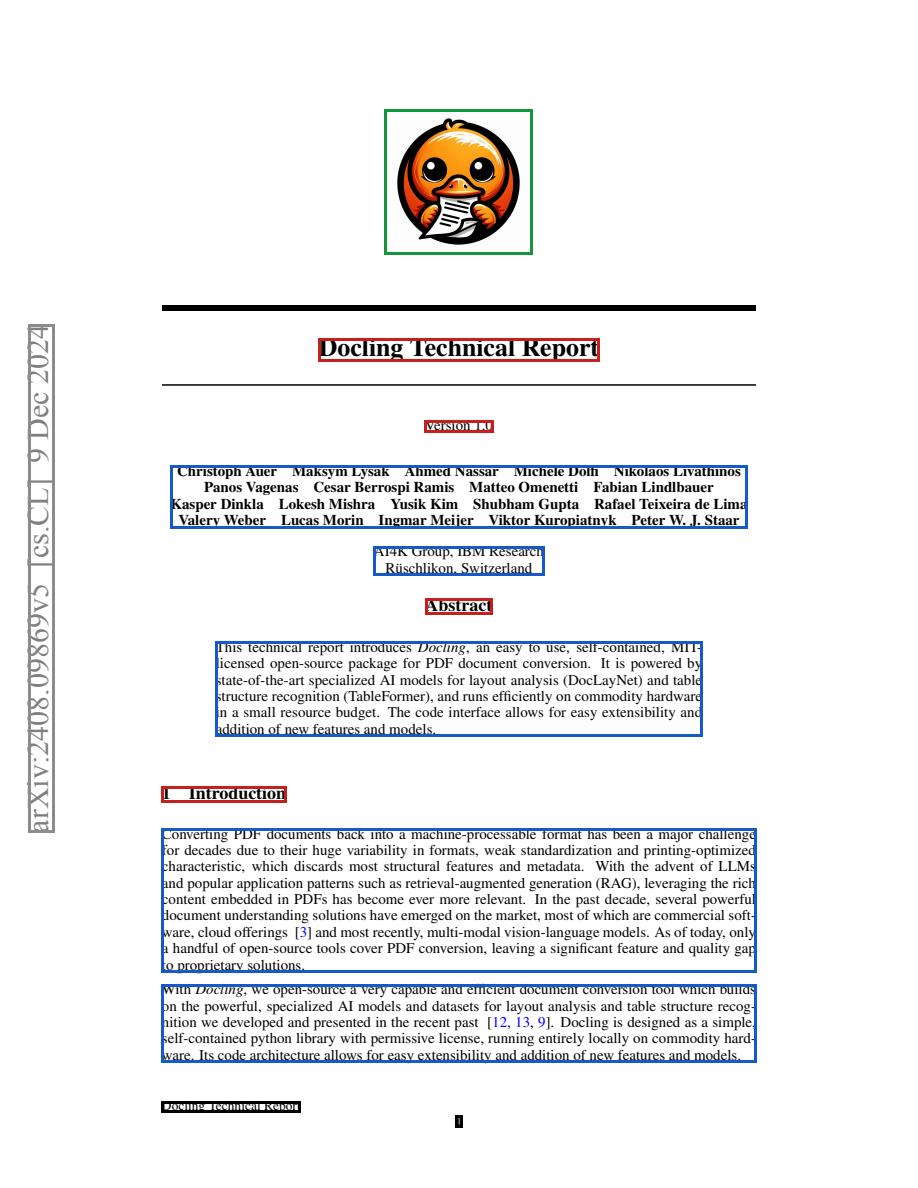
The CLI equivalent needs no code. --to is repeatable, and --page-range takes start-end:
docling report.pdf --no-ocr --page-range 1-3 --to md --to json --output out/Add --image-export-mode referenced if you want figures written as PNG files next to the Markdown instead of inlined as base64, which is the default and makes the .md unpleasant to diff.
Example 2: Tables to CSV, and where TableFormer breaks
Tables are where a text dump and a parse diverge. TableItem.export_to_dataframe() gives you a pandas frame per table, and the table’s own provenance tells you which page and box it came from:
"""Full-document conversion; dump every table as CSV with its page/bbox provenance."""
import sys, time
from pathlib import Path
from docling.document_converter import DocumentConverter

src = Path(sys.argv[1]); out = Path(sys.argv[2]); out.mkdir(exist_ok=True)
t0 = time.perf_counter()
doc = DocumentConverter().convert(src).document
print(f"pages={len(doc.pages)} seconds={time.perf_counter()-t0:.1f} tables={len(doc.tables)}")
for i, table in enumerate(doc.tables):
    prov = table.prov[0]
    df = table.export_to_dataframe(doc=doc)
    df.to_csv(out / f"table-{i}.csv", index=False)
    print(f"table {i}: page {prov.page_no}, bbox {[round(v) for v in prov.bbox.as_tuple()]}, shape {df.shape}")
    print(table.export_to_markdown(doc=doc)[:600])
This run used the default DocumentConverter(), so OCR stayed on and RapidOCR fetched its weights first. All nine pages:
pages=9 seconds=158.9 tables=3
table 0: page 5, bbox [133, 542, 478, 635], shape (2, 8)
table 1: page 8, bbox [125, 438, 223, 505], shape (1, 6)
table 2: page 8, bbox [367, 451, 461, 543], shape (12, 5)
Three tables found, three tables located, and two of them are wrong in ways that matter.
Table 0 is the report’s runtime table: two CPUs, each with a 4-thread and a 16-thread row. TableFormer collapsed each pair of rows into one, so the CSV reads:
CPU.,Thread budget.,native backend.TTS,native backend.Pages/s,native backend.Mem,...
Apple M3 Max,4 16,177 s 167 s,1.27 1.34,6.20 GB,103 s 92 s,2.18 2.45,2.56 GB
“4 16” is two thread budgets fused into one cell. Any downstream code that reads Pages/s gets the string 1.27 1.34 and either crashes or, worse, coerces it.
Table 2 is the DocLayNet mAP table. The two rightmost columns, R101 FRCNN and v5x6 YOLO, merged into one header, and their values merged with them: 70°1 77.7 where the page reads 70.1 and 77.7. The log tells you why before you open the CSV. TableFormer emitted a dozen warnings like Orphan pdf_cell 216 recovered to col=4 by nearest-column fallback, which is its way of saying the predicted grid did not match the text cells and it guessed.
The lesson is not “Docling’s tables are bad”; on ParseBench it is the best local engine at grounding and well ahead on charts. The lesson is that a table with the right shape and the right position can still have fused cells, and the only cheap defence is to assert on shape and type per column before the numbers go anywhere. Treat MatchingPostProcessor warnings as a signal to route that page to a second engine, which is what the next examples give you.
Example 3: granite-docling on Apple Silicon (MLX)
The second shape is a single small vision model that reads the rendered page and emits DocTags, IBM’s markup with location tokens. Docling’s vlm pipeline handles rendering, prompting, and parsing the tags back into the same document structure. On Apple Silicon it auto-selects the MLX export:
docling --pipeline vlm --vlm-model granite_docling --page-range 1-1 \
        --to md --to json --output out-vlm/ report.pdf
The log confirms what was picked and what it cost:
Auto-selecting engine for system=Darwin, device=mps
Selected MLX engine (Apple Silicon with explicit MLX export)
Generated config for mlx: repo_id=ibm-granite/granite-docling-258M-mlx
Processed 1 page(s): 733 tokens in 15.48 sec. (47.36 tok/s)
Finished converting document report.pdf in 42.16 sec.
So about 15 seconds of generation for a dense title page on an M1 with 8 GB, 42 seconds including model load, and 135 seconds wall clock the first time because of the ~500 MB download. Later pages amortise the load. The output has the same shape as Example 1: 12 text items, one picture, each with a bounding box, this time with coord_origin: TOPLEFT because it comes from the VLM’s location tokens rather than the PDF text layer.
The Markdown is close to the standard pipeline’s on this page, including the correct ## Abstract and ## 1 Introduction headings and a fixed umlaut in “Rüschlikon” that the text-layer route rendered as R¨ uschlikon. That is the pattern to expect from small VLMs: better on glyph-level cleanup, riskier on long tables. On a CUDA machine the same command selects the transformers engine and the bf16 checkpoint; on plain CPU it still runs, slowly.
In Python the preset system exposes the same choice, and it is how you pin an engine instead of trusting auto-selection:
from docling.datamodel.base_models import InputFormat
from docling.datamodel.pipeline_options import VlmConvertOptions, VlmPipelineOptions
from docling.datamodel.vlm_engine_options import MlxVlmEngineOptions
from docling.document_converter import DocumentConverter, PdfFormatOption
from docling.pipeline.vlm_pipeline import VlmPipeline

vlm = VlmConvertOptions.from_preset("granite_docling", engine_options=MlxVlmEngineOptions())
pipeline_options = VlmPipelineOptions(vlm_options=vlm)

converter = DocumentConverter(
    format_options={
        InputFormat.PDF: PdfFormatOption(
            pipeline_cls=VlmPipeline, pipeline_options=pipeline_options
        )
    }
)
doc = converter.convert("report.pdf").document
print(doc.export_to_markdown())
VlmConvertOptions.list_preset_ids() on 2.126.0 returns chandra_ocr2, deepseek_ocr, dolphin, dots_mocr, dots_ocr, falcon_ocr, gemma_12b, gemma_27b, glm_ocr, got_ocr, granite_docling, granite_vision, lightonocr, nanonets_ocr2, phi4, pixtral, qwen, smoldocling, and unlimited_ocr. Every one of those is a --vlm-model value on the CLI. The first name on that list is the third shape.
Example 4: Chandra OCR 2 on a GPU, standalone or through Docling
Chandra OCR 2 is Datalab’s 5.3B-parameter document VLM. It reads a page image and writes HTML in which every top-level <div> carries a data-label (Section-Header, Table, Figure, Form, Equation-Block, and so on) and a data-bbox in 0 to 1000 normalised page coordinates. It is the strongest open-weights option for handwriting, forms, and complex tables, and on ParseBench’s leaderboard it posts 70.1 overall, above Gemini 3 Flash’s paper number. Its weights are under a modified OpenRAIL-M licence: free for research, personal use, and companies under $2M in funding or revenue, and not usable to compete with Datalab’s API. Check that before it goes into a product.
We could not run it on the 8 GB machine used for the other examples. At bf16, 5.3B parameters is roughly 10.6 GB of weights before activations; the 8-bit MLX conversion Docling points to is about 5.8 GB. Both need a GPU or a 16 GB+ Apple Silicon box. The commands below are taken from the chandra-ocr 0.2.0 package source and Docling 2.126.0’s preset table rather than from our own run, and the “what we ran” section at the end repeats that.
Chandra’s own CLI
pip install "chandra-ocr[hf]"        # Hugging Face transformers backend, one page at a time
chandra input.pdf ./out --method hf --page-range 1-5
With --method hf the CLI forces a batch size of 1 and loads datalab-to/chandra-ocr-2 in bf16 with device_map="auto". Set TORCH_DEVICE=cuda:0 (or mps) in the environment or a local.env file to pin the device. For throughput, run the model under vLLM and let the CLI batch 28 pages at a time:
pip install chandra-ocr              # vLLM backend is the default
chandra_vllm --gpu 4090              # launches vLLM on :8000 with settings scaled to 24 GB
chandra ./documents ./out --method vllm --max-workers 4
chandra_vllm knows presets for h100, a100, a100-40, l40s, a10, l4, 4090, 3090, and t4, and scales batch tokens and sequence count down from an 80 GB baseline. The client side reads VLLM_API_BASE (default http://localhost:8000/v1) and VLLM_MODEL_NAME (default chandra).
For each input file the CLI writes <name>/<name>.md, <name>/<name>.html, extracted images, and a <name>_metadata.json with per-page token counts and the page box. The HTML is the grounded artifact; the Markdown is a lossy convenience view of it. Useful flags: --no-images, --include-headers-footers (off by default), --max-output-tokens (default 12384), and --paginate_output to insert page separators.
Chandra through Docling
Docling 2.126.0 ships a first-party chandra_ocr2 preset, so the same --pipeline vlm command from Example 3 drives Chandra and normalises its HTML into a DoclingDocument:
docling --pipeline vlm --vlm-model chandra_ocr2 --to md --to json --output out-chandra/ scan.pdfThe preset’s engine table, read from docling/datamodel/stage_model_specs.py:
- MLX (Apple Silicon):
mlx-community/chandra-ocr-2-oQ8, an 8-bit export, requiresmlx-vlm >= 0.6.17because older releases break on the Qwen3-VL vision tower. - transformers (CUDA/CPU):
datalab-to/chandra-ocr-2in bf16, chat-style prompting, stop strings stripped. - vLLM: same repo with
enforce_eager=True. - API: OpenAI-compatible endpoints, including Ollama and LM Studio, expecting a served model named
chandra-ocr-2withmax_tokens12384.
Response parsing uses ResponseFormat.CHANDRA_HTML, which turns each data-bbox div into a located element, so the JSON export carries provenance exactly like Examples 1 and 3. The prompt Docling sends is Chandra’s own layout prompt, asking for the labelled, boxed HTML described above.
If your Mac has 16 GB or more, the Python form lets you swap the 8-bit export for a smaller community quantisation such as 1qh/chandra-ocr-2-4bit-mlx by overriding repo_id on the model spec. We have not measured what 4-bit costs on table accuracy; the MacBook ParseBench post discusses quantisation as a point or two on structured tasks and treats bf16 numbers as the upper bound.
Example 5: Ollama as the model server
Ollama is the easiest way to keep a model resident across many parse jobs and to share one GPU between a parser and other local tooling. It exposes an OpenAI-compatible chat endpoint at http://localhost:11434/v1/chat/completions, which is what Docling’s API engines expect. Two things to know:
- Docling refuses to call any network endpoint, even
localhost, unless you setenable_remote_services=Trueon the pipeline options. This is deliberate: it makes the “offline” claim explicit in code. - The model name Docling sends must match the name Ollama serves. Presets carry a default, but Ollama tags are yours to change.
granite-docling served by Ollama
The official ibm/granite-docling:258m tag is a 522 MB download. Docling’s preset expects exactly that name:
ollama pull ibm/granite-docling:258mfrom docling.datamodel.base_models import InputFormat
from docling.datamodel.pipeline_options import VlmConvertOptions, VlmPipelineOptions
from docling.datamodel.vlm_engine_options import ApiVlmEngineOptions, VlmEngineType
from docling.document_converter import DocumentConverter, PdfFormatOption
from docling.pipeline.vlm_pipeline import VlmPipeline
vlm = VlmConvertOptions.from_preset(
"granite_docling",
engine_options=ApiVlmEngineOptions(engine_type=VlmEngineType.API_OLLAMA),
)
pipeline_options = VlmPipelineOptions(vlm_options=vlm, enable_remote_services=True)
converter = DocumentConverter(
format_options={
InputFormat.PDF: PdfFormatOption(
pipeline_cls=VlmPipeline, pipeline_options=pipeline_options
)
}
)
doc = converter.convert("report.pdf").documentApiVlmEngineOptions defaults its url to the Ollama endpoint above; pass url= to point at LM Studio (:1234) or a vLLM server (:8000), and headers= if the server wants a key.
DeepSeek-OCR and Chandra served by Ollama
Docling’s deepseek_ocr preset is Ollama-only by design: it calls deepseek-ocr:3b (a 6.7 GB pull) with DeepSeek’s <|grounding|> prompt and parses the grounded Markdown back into located elements.
ollama pull deepseek-ocr:3b
docling --pipeline vlm --vlm-model deepseek_ocr --to md report.pdf
Chandra is not in Ollama’s official library. The uploads that exist are community conversions; fredrezones55/chandra-ocr-2 is a 5.8 GB Q8 build with a :patch tag that its author added to restore vision input. Docling’s preset expects the served name chandra-ocr-2, so alias it:
ollama pull fredrezones55/chandra-ocr-2:patch
ollama cp fredrezones55/chandra-ocr-2:patch chandra-ocr-2
and then the Ollama form of Example 4:
vlm = VlmConvertOptions.from_preset(
    "chandra_ocr2",
    engine_options=ApiVlmEngineOptions(engine_type=VlmEngineType.API_OLLAMA),
)
Two cautions from the community pages. GGUF conversions of Chandra below Q8 have been reported to misbehave, so do not reach for a 4-bit Ollama build expecting the bf16 numbers. And Ollama applies its own context limit per model, which can sit below Chandra’s 12384-token output ceiling; if pages come back truncated, raise num_ctx in a Modelfile before blaming the model.
Memory budget: what fits where
Sizes below are the published download sizes or, for bf16, parameter count times two bytes. Activations and page images add to all of them.
| Model | Weights | Runs on |
|---|---|---|
| Docling standard pipeline (layout + TableFormer + RapidOCR) | ~2 GB total | Any CPU; we used an 8 GB M1 |
| granite-docling 258M (MLX, transformers, or Ollama) | ~0.5 GB | 8 GB laptop, ran here at 47 tok/s on MLX |
| DeepSeek-OCR 3B via Ollama | 6.7 GB | 16 GB Mac or an 8 GB+ GPU |
| Chandra OCR 2, 8-bit (MLX oQ8 or Ollama Q8) | ~5.8 GB | 16 GB Mac; 8 GB GPUs are tight |
| Chandra OCR 2, bf16 (transformers or vLLM) | ~10.6 GB | 16 GB+ GPU; 24 GB for comfortable batching |
On an 8 GB machine the honest answer is: run the standard pipeline everywhere and granite-docling on the pages that need it, and send handwriting or forms to a Chandra box elsewhere on your network over Ollama or vLLM, which is still offline in the sense that matters.
Verify before you trust
The three checks that caught every problem in this post:
- Draw the boxes. Render the page with
pypdfium2, draw each element’sprov[0].bbox, and look. Ten seconds per page, and the only way to see a mis-segmented column. Remember the coordinate origin differs by route:BOTTOMLEFTfrom the text-layer pipeline,TOPLEFTfrom the VLM pipeline. - Assert on table shape and column types. Fused rows and columns survive Markdown export unchanged.
df.shapeagainst an expected shape, pluspd.to_numeric(errors="raise")on numeric columns, turns “4 16” into a loud failure. - Route on disagreement, not on averages. Run the cheap pipeline everywhere. Where it warns (orphan cells, low OCR confidence) or where two engines disagree on a table, send that page to the large VLM. Page-class routing is a few dozen lines of Python, and it keeps the expensive model off the 90% of pages that do not need it.
If you want a hosted second opinion on the hard pages, that is the shape okraPDF is built for: bounding-box-grounded output over an API, with the same page and box semantics as the Docling JSON above, and an ingest endpoint that accepts a Docling document you parsed locally so the sensitive pages never leave. Everything above works without it.
What we ran and what we did not
Hardware: Apple M1, 8 GB unified memory, macOS 15.7, no discrete GPU. Software: Python 3.12.14, Docling 2.126.0 with docling-core 2.95.0, mlx-vlm 0.7.0, chandra-ocr 0.2.0 (source inspected).
| Section | Status |
|---|---|
| Example 1, Docling standard pipeline, 3 pages | Ran; 28.7 s cold, output and figure above are from that run |
| Example 2, tables to CSV, 9 pages with default OCR | Ran; 158.9 s, both table failures are real |
| Example 3, granite-docling via MLX | Ran; 733 tokens in 15.5 s, 42 s total convert |
| Example 4, Chandra OCR 2 (CLI, vLLM, Docling preset) | Not run here; needs more memory than this machine has. Commands and engine table read from installed package source |
| Example 5, Ollama-served models | Not run here; preset names, URLs, and tags read from Docling source and the Ollama library pages |
We will update this post with a Chandra run once it is done on a GPU box, and the timing table above will say so when it happens.