
PDF extraction
Purchase Order Automation: Build a PO-to-ERP AI Agent You Own
Automate purchase order entry: an AI agent reads PO PDFs from an Outlook inbox, checks them against ERP data, and writes one import CSV per order.
Manufacturers and distributors keep describing the same problem. Purchase orders arrive all day as PDF attachments, every customer formats them differently, and the customer service team retypes each one into the ERP. They want an AI agent to do the typing. They also want to run it themselves, inside their own environment, instead of paying for another SaaS seat.
The requirements are nearly always the same list:
- Watch the order inbox (Microsoft 365 / Outlook, sometimes Front) and pick out the emails that actually contain purchase orders.
- Pull the order data out of the PDF: PO number, customer, bill-to and ship-to, line items, quantities, units of measure, prices, requested dates, and shipping notes, including third-party carrier account numbers.
- Handle messy paperwork. Faxes, scans that are rotated or upside down, cover sheets and terms pages, handwritten order forms, and layouts it has never seen. A template per customer is not an option.
- Check everything against ERP reference data: customers, ship-to addresses, item numbers (including customer and legacy part numbers), units of measure, and prices.
- Flag anything it is unsure about so a rep knows exactly what to double-check.
- Write one CSV per order in a fixed format, into the folder the existing ERP import already watches.
This post builds that agent in about 340 lines of Python. Everything except reading the PDF is open-source code you run on your own server: Microsoft Graph for the inbox, rapidfuzz for matching against your ERP data, and the standard library for the CSV. Reading the PDF is one okraPDF API call. We ran it on three test documents, and every output below comes from those runs.
Disclosure: okraPDF sells the parsing API used in step 2. All company names, addresses, and part numbers below are invented.
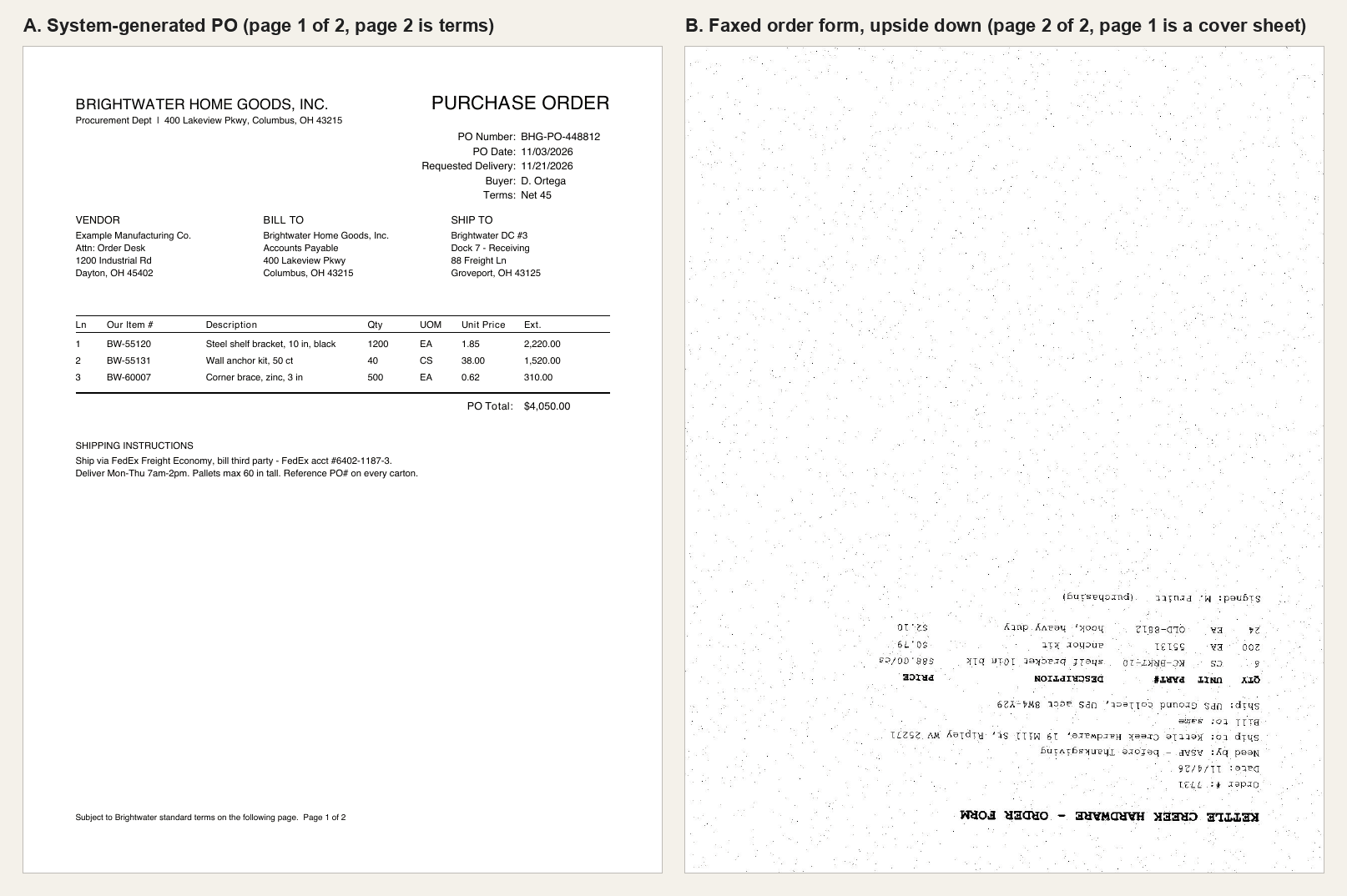
Table of Contents
- The design: the model reads, your code decides
- Step 1: Describe an order as a JSON schema
- Step 2: Extract the fields with okraPDF
- Step 3: Check every field against your ERP data
- Step 4: Write one CSV per order
- Step 5: Watch the inbox
- What the run produced
- Before you turn it on
- Keeping PDFs inside your network
- FAQ
The design: the model reads, your code decides
The agent splits the work in two:
- A model only transcribes. It turns the PDF into JSON that matches a schema you wrote: what the document says, nothing more.
- Plain code makes every business decision. Which customer this is, which of your items a line means, whether the price is right. Each decision is a lookup against your own ERP exports.
That split is what makes requirement 5 achievable. A lookup knows when it missed. A model asked “is this the right item?” tends to answer yes. It also removes the need for templates: the schema says what you want, not where it sits on the page, so a layout you have never seen needs no setup.
Order mailbox (M365)
  → Microsoft Graph: unread messages, PDF attachments          your server
  → okraPDF  POST /v1/files → POST /v1/parse {schema}           API call
             GET /v1/jobs/{id} until terminal
  → validate: customers, ship-tos, items, UoM, prices          your server
  → clean   → erp_import/7731.csv     (the folder the ERP watches)
flagged → review/7731.csv + review/7731.flags.json| Piece | Where it runs | Tool |
|---|---|---|
| Inbox watcher | Your server | Microsoft Graph via msal + httpx |
| PDF → fields | okraPDF API | POST /v1/parse with a JSON schema |
| ERP checks | Your server | rapidfuzz + CSV exports from your ERP |
| Import file | Your server | Python csv, atomic rename into the watched folder |
Your customer list, price list, and item master never leave your network. Only the PDF does. If the PDF can’t leave either, see the last section.
Everything below lives in two files, po_agent.py and inbox.py. The code blocks in this post add up to the complete agent. po_agent.py starts like this, and the inline dependency header means uv run po_agent.py some-po.pdf installs httpx and rapidfuzz on first run:
# /// script
# requires-python = ">=3.10"
# dependencies = ["httpx", "rapidfuzz"]
# ///
from __future__ import annotations

import csv, json, os, re, sys, time
from datetime import date
from pathlib import Path

import httpx
from rapidfuzz import fuzz, process
from rapidfuzz.utils import default_process  # lowercase + strip punctuation; rapidfuzz 3 does not by default

API = "https://api.okrapdf.com/v1"
HERE = Path(__file__).parent
ERP = HERE / "erp"                     # nightly CSV exports from your ERP
PRICE_TOLERANCE = 0.005                # 0.5%
PARSER = "llamaparse"                  # layout-aware + OCR; step 2 explains why
OUR_NAMES = ["Example Manufacturing", "Example Mfg"]  # your own company: never a bill-to or ship-to
Step 1: Describe an order as a JSON schema
The schema is the agent’s only instruction about what a purchase order is:
PO_SCHEMA = {
    "type": "object",
    "properties": {
        "is_purchase_order": {
            "type": "boolean",
            "description": "True only if the document contains a customer purchase order or order form.",
        },
        "po_number": {"type": ["string", "null"], "description": "Customer PO / order number. null if absent."},
        "po_date": {"type": ["string", "null"], "description": "Order date as YYYY-MM-DD."},
        "customer_name": {"type": ["string", "null"], "description": "The ordering company (the buyer)."},
        "bill_to": {"type": ["string", "null"], "description": "Bill-to name and address on one line."},
        "ship_to": {"type": ["string", "null"], "description": "Ship-to name and address on one line."},
        "requested_date_text": {"type": ["string", "null"], "description": "Requested/need-by date exactly as written."},
        "requested_date": {
            "type": ["string", "null"],
            "description": "Requested date as YYYY-MM-DD, or null if it is not a specific calendar date.",
        },
        "carrier": {"type": ["string", "null"]},
        "freight_terms": {"type": ["string", "null"], "description": "e.g. prepaid, collect, third party."},
        "carrier_account_number": {"type": ["string", "null"], "description": "Third-party or collect carrier account #."},
        "shipping_notes": {"type": ["string", "null"]},
        "lines": {
            "type": "array",
            "items": {
                "type": "object",
                "properties": {
                    "part_number": {"type": ["string", "null"], "description": "Part/item number exactly as printed."},
                    "description": {"type": ["string", "null"]},
                    "quantity": {"type": "number"},
                    "uom": {"type": ["string", "null"], "description": "Unit of measure as printed, e.g. EA, CS."},
                    "unit_price": {"type": ["number", "null"]},
                    "price_uom": {"type": ["string", "null"], "description": "Unit the price is quoted per, if stated."},
                    "extended_price": {"type": ["number", "null"]},
                },
                "required": ["part_number", "description", "quantity", "uom", "unit_price"],
            },
        },
        "po_total": {"type": ["number", "null"]},
    },
    "required": ["is_purchase_order", "po_number", "customer_name", "ship_to", "lines"],
}
Five choices in that schema do most of the work:
is_purchase_orderis the email filter. Invoices, statements, and quotes land in the same inbox. Our test invoice even carried a “Your PO ref” line, and it still came backfalseand was skipped.- Every field can be
null. Missing is different from invented. A missing PO number has to reach a rep as a flag, not as a plausible-looking guess. - The requested date is asked for twice: once exactly as written, once as an ISO date or
null. “ASAP - before Thanksgiving” keeps its text, gets anulldate, and gets flagged. The model never picks a date for you. - Part numbers are copied as printed. Mapping a customer’s number to yours is your code’s job, so the model is told not to fix anything.
price_uomis separate fromuom. “6 CS at $88.00/cs” and “200 EA at $0.79” need different math.
Step 2: Extract the fields with okraPDF
Upload the file, start a parse job with the schema, and poll until the job is terminal:
def extract(pdf: Path) -> dict:
    """Upload a PDF, parse it against PO_SCHEMA, poll until the job is terminal."""
    headers = {"Authorization": f"Bearer {os.environ['OKRA_API_KEY']}"}
    with httpx.Client(headers=headers, timeout=120) as http:
        for attempt in range(4):  # uploads occasionally 5xx; retry with backoff
            up = http.post(f"{API}/files", files={"file": (pdf.name, pdf.read_bytes(), "application/pdf")})
            if up.status_code < 500:
                break
            time.sleep(2**attempt)
        up.raise_for_status()
        job = http.post(
            f"{API}/parse",
            json={"parser": PARSER, "file": {"id": up.json()["id"]}, "schema": PO_SCHEMA},
        )
        job.raise_for_status()
        job = job.json()
        deadline = time.monotonic() + 600  # a stalled job should fail this run, not hang the agent
        while not job.get("terminal"):
            if time.monotonic() > deadline:
                raise TimeoutError(f"job {job['id']} still {job.get('status')} after 10 minutes")
            time.sleep(max(1, (job.get("next_poll_after_ms") or 3000) / 1000))
            try:
                r = http.get(f"{API}/jobs/{job['id']}")
            except httpx.TransportError:
                continue  # dropped keep-alive connection; just poll again
            if r.status_code >= 500:
                continue
            r.raise_for_status()
            job = r.json()
    if job["status"] not in ("succeeded", "completed", "completed_with_errors"):
        raise RuntimeError(f"parse failed: {job.get('status')} {job.get('user_message') or job.get('error')}")
    extracted = (job.get("result") or {}).get("extracted")
    if not extracted:  # never let "no extraction" look like "not a PO" and get silently skipped
        raise RuntimeError(f"job {job['id']} returned no extracted data; was the schema applied?")
    return {"job_id": job["id"], "schema_valid": extracted["schema_valid"], "po": extracted["data"] or {}}
POST /v1/parse returns 202 right away. The job response carries a terminal flag and a next_poll_after_ms hint, so the loop never guesses. When the job finishes, the fields are in result.extracted.data. Each document took about 10 to 13 seconds.
Three guards in there come from running this, not from theory:
- Tolerate a dropped connection while polling. During testing, the server once closed an idle keep-alive connection between polls. Retry the poll; don’t crash the run.
- Give the loop a deadline. A job that never finishes should fail this run, so the email stays unread and gets retried next time. It shouldn’t hang the agent.
- Fail loudly on a missing
extractedblock. Otherwise a naive version readsis_purchase_orderas missing and skips the order as “not a PO”. That’s a lost order nobody sees.
Pick a layout-aware parser (the one mistake we hit)
The parser field picks the engine that reads the page. Our first run used textlayer on the clean PO. It reads the text already embedded in a system-generated PDF, so it seemed like the obvious fast choice. It read the three-column header (Vendor | Bill to | Ship to) as running text and shifted every block one column to the left:
// parser: "textlayer"
"bill_to": "Example Manufacturing Co., Attn: Order Desk, 1200 Industrial Rd, Dayton, OH 45402",
"ship_to": "Brightwater Home Goods, Inc., Accounts Payable, 400 Lakeview Pkwy, Columbus, OH 43215"

// parser: "llamaparse"
"bill_to": "Brightwater Home Goods, Inc., Accounts Payable, 400 Lakeview Pkwy, Columbus, OH 43215",
"ship_to": "Brightwater DC #3, Dock 7 - Receiving, 88 Freight Ln, Groveport, OH 43125"
The bill-to became our own address, and the ship-to became the customer’s headquarters. The worst part: headquarters is a real ship-to on file, so the fuzzy ship-to check in step 3 accepted it, and schema_valid was true for both runs. Schema validity tells you the JSON has the right shape, not that the values are right. Only the self-address guard in step 3 caught it, and we wrote that guard because of this run.
So use a layout-aware parser that also OCRs scans for every PO, digital or not. llamaparse got both POs right and took about the same time.
The fax
The fax was the hard case on purpose: a cover sheet, then an order form rotated 180°, reduced to 1-bit black and white, with speckle noise. It went through the same call with no rotation step and no template:
{
  "is_purchase_order": true,
  "po_number": "7731",
  "po_date": "2026-11-04",
  "customer_name": "Kettle Creek Hardware",
  "bill_to": "same",
  "ship_to": "Kettle Creek Hardware, 19 Mill St, Ripley WV 25271",
  "requested_date_text": "ASAP - before Thanksgiving",
  "requested_date": null,
  "carrier": "UPS",
  "freight_terms": "collect",
  "carrier_account_number": "8W4-Y29",
  "lines": [
    { "part_number": "KC-BRKT-10", "description": "shelf bracket 10in blk", "quantity": 6, "uom": "CS", "unit_price": 88, "price_uom": "cs" },
    { "part_number": "55131", "description": "anchor kit", "quantity": 200, "uom": "EA", "unit_price": 0.79, "price_uom": null },
    { "part_number": "OLD-8812", "description": "hook, heavy duty", "quantity": 24, "uom": "EA", "unit_price": 2.1, "price_uom": null }
  ]
}
It ignored the cover sheet and split “Ship: UPS Ground collect, UPS acct 8W4-Y29” into carrier, freight terms, and account number. It kept the bad date as text with a null value instead of inventing one. (Trimmed: null fields and extended_price omitted.)
Two synthetic documents make a demo, not a benchmark. Handwritten order forms are the case to test hardest on your own paperwork. Our handwriting OCR benchmark measures reading accuracy on handwritten lines, but a handwritten form adds layout guesswork on top: which number is the quantity, which is the part number.
Step 3: Check every field against your ERP data
The reference data is four CSV exports from the ERP, refreshed nightly or on whatever schedule your ERP can export:
erp/customers.csv       customer_id,name,aliases
erp/ship_to.csv         customer_id,ship_to_id,name,address
erp/items.csv           item_no,description,base_uom,case_qty,list_price,legacy_part_no
erp/customer_xref.csv customer_id,customer_part_no,item_noitem_no,description,base_uom,case_qty,list_price,legacy_part_no
EX-55120,Shelf bracket 10 in black steel,EA,48,1.85,
EX-55131,Wall anchor kit,EA,50,0.76,
EX-60070,Corner brace 3 in zinc plated,EA,100,0.62,
EX-71220,Utility hook heavy duty,EA,24,2.10,OLD-8812Item resolution is a ladder. Exact lookups come first, fuzzy matching comes last, and anything fuzzy gets flagged:
def load(name: str) -> list[dict]:
    with open(ERP / name, newline="") as fh:
        return list(csv.DictReader(fh))

CUSTOMERS, SHIP_TOS = load("customers.csv"), load("ship_to.csv")
ITEMS = {r["item_no"]: r for r in load("items.csv")}
LEGACY = {r["legacy_part_no"]: r["item_no"] for r in ITEMS.values() if r["legacy_part_no"]}
XREF = {(r["customer_id"], r["customer_part_no"]): r["item_no"] for r in load("customer_xref.csv")}

def norm(s: str | None) -> str:
    return re.sub(r"[^A-Z0-9]", "", (s or "").upper())

def match_customer(name: str | None) -> tuple[dict | None, float]:
    choices = {}
    for c in CUSTOMERS:
        for alias in [c["name"], *filter(None, c["aliases"].split("|"))]:
            choices[alias] = c
    hit = process.extractOne(name or "", list(choices), scorer=fuzz.WRatio, processor=default_process)
    return (choices[hit[0]], hit[1]) if hit else (None, 0)

def match_ship_to(customer_id: str, ship_to: str | None) -> tuple[dict | None, float]:
    options = [s for s in SHIP_TOS if s["customer_id"] == customer_id]
    labels = [f'{s["name"]} {s["address"]}' for s in options]
    hit = process.extractOne(ship_to or "", labels, scorer=fuzz.token_set_ratio, processor=default_process)
    return (options[hit[2]], hit[1]) if hit else (None, 0)

def resolve_item(customer_id: str, part: str | None, desc: str | None) -> tuple[str | None, str]:
    """Return (our item_no, how it was matched). Deterministic lookups first, fuzzy last."""
    p = (part or "").strip()
    if p in ITEMS:
        return p, "item_no"
    if (customer_id, p) in XREF:
        return XREF[(customer_id, p)], "customer_part_no"
    if p in LEGACY:
        return LEGACY[p], "legacy_part_no"
    digits = [i for i in ITEMS if norm(p) and norm(i).endswith(norm(p))]
    if len(digits) == 1:
        return digits[0], "partial_number"            # flagged
    hit = process.extractOne(desc or "", {k: v["description"] for k, v in ITEMS.items()},
                             scorer=fuzz.token_set_ratio, processor=default_process)
    if hit and hit[1] >= 80:
        return hit[2], "description_only"             # flagged
    return None, "unmatched"                          # flagged
Then validate() runs the header and line checks and collects flags as plain sentences a rep can act on:
def validate(po: dict) -> tuple[dict, list[dict], list[str]]:
    flags: list[str] = []
    header: dict = {}

    if not po.get("po_number"):
        flags.append("Missing PO number")

    for field in ("bill_to", "ship_to"):
        if any(fuzz.partial_ratio(n.lower(), (po.get(field) or "").lower()) >= 90 for n in OUR_NAMES):
            flags.append(f"{field} looks like our own address, the vendor block was probably misread")

    cust, score = match_customer(po.get("customer_name"))
    if not cust or score < 90:
        flags.append(f'Unrecognized customer "{po.get("customer_name")}" (best match {score:.0f})')
        cust = None
    header["customer_id"] = cust["customer_id"] if cust else ""

    ship, s_score = match_ship_to(header["customer_id"], po.get("ship_to")) if cust else (None, 0)
    if cust and (not ship or s_score < 85):
        flags.append(f'Unrecognized ship-to "{po.get("ship_to")}"')
    header["ship_to_id"] = ship["ship_to_id"] if ship and s_score >= 85 else ""

    req = po.get("requested_date")
    try:
        date.fromisoformat(req or "")
    except ValueError:
        flags.append(f'Ambiguous requested date "{po.get("requested_date_text")}"')
        req = ""
    header["requested_date"] = req

    lines = []
    for n, ln in enumerate(po.get("lines") or [], start=1):
        item_no, how = resolve_item(header["customer_id"], ln.get("part_number"), ln.get("description"))
        if how == "unmatched":
            flags.append(f'Line {n}: unrecognized item "{ln.get("part_number")}" / "{ln.get("description")}"')
            lines.append({**ln, "item_no": "", "base_qty": "", "base_uom": "", "base_price": ""})
            continue
        if how in ("partial_number", "description_only"):
            flags.append(f'Line {n}: "{ln.get("part_number")}" matched to {item_no} by {how.replace("_", " ")}, confirm')

        item = ITEMS[item_no]
        uom = (ln.get("uom") or item["base_uom"]).upper()
        per = {item["base_uom"]: 1, "CS": int(item["case_qty"])}.get(uom)  # CS → EA via case pack
        if per is None:
            flags.append(f'Line {n}: unknown unit of measure "{uom}" for {item_no}')
            per = 1
        price_per = (ln.get("price_uom") or uom).upper()
        price_div = {item["base_uom"]: 1, "CS": int(item["case_qty"])}.get(price_per, per)
        base_price = (ln["unit_price"] or 0) / price_div
        listed = float(item["list_price"])
        if ln.get("unit_price") is None:
            flags.append(f"Line {n}: no unit price on PO")
        elif abs(base_price - listed) / listed > PRICE_TOLERANCE:
            flags.append(
                f"Line {n}: price mismatch on {item_no}: PO ${base_price:.4f}/{item['base_uom']} "
                f"vs list ${listed:.2f}/{item['base_uom']}"
            )
        lines.append({**ln, "item_no": item_no, "base_qty": ln["quantity"] * per,
                      "base_uom": item["base_uom"], "base_price": round(base_price, 4)})
    return header, lines, flags
Real ERPs carry more units than EA and CS (pallets, boxes, per-hundred pricing). Replace the two-entry dictionaries with a lookup into your UoM conversion table. Any unit missing from it gets flagged instead of guessed.
Two lessons from running it:
- Normalize before fuzzy matching. rapidfuzz 3 applies no preprocessing by default. In one run the model wrote the ship-to with commas (“88 Freight Ln, Groveport, OH”), and tokens like
Ln,stopped matchingLn, so a correct address scored below 85 and got flagged. Passingprocessor=default_processfixed it. Extraction punctuation varies from run to run, so the matcher has to tolerate that. - Check for your own name. The self-address guard is two lines, and it was the only check that caught the text-layer misread above. The vendor block on a PO is always you, so your own name in a bill-to or ship-to is always wrong.
Units and prices are normalized to the item’s base unit before comparing. That’s why “6 CS at $88.00/cs” can be checked against a per-each list price at all.
Step 4: Write one CSV per order
Clean orders go straight into the folder the ERP import watches. Flagged orders go to a review/ folder, with a .flags.json next to them that lists the reasons and the raw extraction:
CSV_COLUMNS = ["po_number", "customer_id", "ship_to_id", "requested_date", "line", "item_no",
               "quantity", "uom", "unit_price", "carrier", "freight_terms", "carrier_account"]

def write_order(po, header, lines, flags, out_root: Path) -> Path:
    folder = out_root / ("review" if flags else "erp_import")
    folder.mkdir(parents=True, exist_ok=True)
    stem = re.sub(r"[^A-Za-z0-9_-]", "_", po.get("po_number") or f"unknown-{int(time.time())}")
    path = folder / f"{stem}.csv"
    if flags:  # write the reasons first so a rep never sees a review CSV without them
        path.with_suffix(".flags.json").write_text(json.dumps({"flags": flags, "extracted": po}, indent=2))
    tmp = folder / f".{stem}.csv.tmp"  # dotfile + atomic rename: the ERP watcher never sees a partial file
    with open(tmp, "w", newline="") as fh:
        w = csv.DictWriter(fh, fieldnames=CSV_COLUMNS)
        w.writeheader()
        for n, ln in enumerate(lines, start=1):
            w.writerow({
                "po_number": po.get("po_number") or "", **header, "line": n, "item_no": ln["item_no"],
                "quantity": ln["base_qty"], "uom": ln["base_uom"], "unit_price": ln["base_price"],
                "carrier": po.get("carrier") or "", "freight_terms": po.get("freight_terms") or "",
                "carrier_account": po.get("carrier_account_number") or "",
            })
    os.replace(tmp, path)
    return path

def handle_pdf(pdf: Path, out_root: Path = HERE / "out") -> Path | None:
    """One PDF in, one routed CSV out (or None when the attachment is not a PO)."""
    res = extract(pdf)
    po = res["po"]
    if not po.get("is_purchase_order"):
        print(f"{pdf.name}: not a purchase order, skipped")
        return None
    header, lines, flags = validate(po)
    path = write_order(po, header, lines, flags, out_root)
    print(f"\n{pdf.name} -> {path}  (job {res['job_id']}, schema_valid={res['schema_valid']})")
    for f in flags:
        print(f"  FLAG  {f}")
    return path

if __name__ == "__main__":
    for arg in sys.argv[1:]:
        handle_pdf(Path(arg))
Match CSV_COLUMNS to your ERP’s import spec. The atomic rename matters more than it looks: file watchers often pick up a file the moment it appears, and a half-written order is worse than no order. os.replace is atomic only within one filesystem, so write the temp file in the target folder, as above, and not in /tmp.
A rep’s review loop is simple: open the flags, fix the CSV, and move it into erp_import/.
Step 5: Watch the inbox
Microsoft Graph with app-only auth reads one shared mailbox. Register an app in Entra ID, grant it the Mail.ReadWrite application permission (write access is needed to mark messages read), and limit it to the order mailbox with Exchange Online RBAC for Applications or an application access policy, so it can’t read anyone else’s mail.
# inbox.py
# /// script
# requires-python = ">=3.10"
# dependencies = ["httpx", "msal", "rapidfuzz"]
# ///
import hashlib, os
from pathlib import Path

import httpx
import msal

from po_agent import handle_pdf

G = "https://graph.microsoft.com/v1.0"
MAILBOX = os.environ["ORDER_MAILBOX"]  # e.g. orders@yourcompany.com

def graph_token() -> str:
    app = msal.ConfidentialClientApplication(
        os.environ["AZURE_CLIENT_ID"],
        authority=f"https://login.microsoftonline.com/{os.environ['AZURE_TENANT_ID']}",
        client_credential=os.environ["AZURE_CLIENT_SECRET"],
    )
    return app.acquire_token_for_client(scopes=["https://graph.microsoft.com/.default"])["access_token"]

def unread_pdfs(download_dir: Path):
    """Yield (message, pdf_path). A message is marked read only after all its PDFs were processed."""
    download_dir.mkdir(parents=True, exist_ok=True)
    box = f"{G}/users/{MAILBOX}"
    with httpx.Client(headers={"Authorization": f"Bearer {graph_token()}"}, timeout=60) as g:
        msgs = g.get(f"{box}/mailFolders/inbox/messages", params={
            "$filter": "hasAttachments eq true and isRead eq false",
            "$select": "id,subject,from,receivedDateTime",
            "$top": "25",
        }).json()["value"]
        for m in msgs:
            atts = g.get(f"{box}/messages/{m['id']}/attachments", params={"$select": "id,name,contentType,size"})
            for a in atts.json()["value"]:
                is_file = a.get("@odata.type") == "#microsoft.graph.fileAttachment"
                is_pdf = a.get("contentType") == "application/pdf" or a["name"].lower().endswith(".pdf")
                if not (is_file and is_pdf):
                    continue  # signatures, logos, spreadsheets
                raw = g.get(f"{box}/messages/{m['id']}/attachments/{a['id']}/$value").content
                key = hashlib.sha1(f"{m['id']}/{a['id']}".encode()).hexdigest()[:16]
                path = download_dir / f"{key}.pdf"
                path.write_bytes(raw)
                yield m, path
            g.patch(f"{box}/messages/{m['id']}", json={"isRead": True})

for message, pdf in unread_pdfs(Path("inbox")):
    print(message["subject"], "->", handle_pdf(pdf))  # extract → validate → write_order
The message is marked read only after the generator resumes past its last attachment. So if processing crashes partway through, the email stays unread and the next run retries it. Run the script every couple of minutes from cron, a systemd timer, or a container scheduler. Graph change notifications can replace polling later.
We didn’t run this part against a live tenant for this post. The endpoints follow the Graph v1.0 docs, and the $value call returns raw attachment bytes. If your orders land in Front instead, pull attachments through Front’s API. Everything after that point is identical.
What the run produced
Three documents went through the same code, one after another, in 31 seconds total:
$ uv run po_agent.py out/po-clean.pdf out/po-fax.pdf out/not-a-po-invoice.pdf

po-clean.pdf -> out/review/BHG-PO-448812.csv  (job job_b269296ce5d44aa8acc75af0, schema_valid=True)
  FLAG  Line 3: "BW-60007" matched to EX-60070 by description only, confirm

po-fax.pdf -> out/review/7731.csv  (job job_dc0789b8bad041c0aaa17845, schema_valid=True)
  FLAG  Ambiguous requested date "ASAP - before Thanksgiving"
  FLAG  Line 1: price mismatch on EX-55120: PO $1.8333/EA vs list $1.85/EA
  FLAG  Line 2: "55131" matched to EX-55131 by partial number, confirm
  FLAG  Line 2: price mismatch on EX-55131: PO $0.7900/EA vs list $0.76/EA
not-a-po-invoice.pdf: not a purchase order, skipped
The fax order as the ERP will see it, once a rep clears the flags:
po_number,customer_id,ship_to_id,requested_date,line,item_no,quantity,uom,unit_price,carrier,freight_terms,carrier_account
7731,C1002,ST-01,,1,EX-55120,288,EA,1.8333,UPS,collect,8W4-Y29
7731,C1002,ST-01,,2,EX-55131,200,EA,0.79,UPS,collect,8W4-Y29
7731,C1002,ST-01,,3,EX-71220,24,EA,2.1,UPS,collect,8W4-Y29
Every flag is one a person should see:
| Flag | Why a rep should look |
|---|---|
BW-60007 matched by description only |
The customer’s part number isn’t in the cross-reference. “Corner brace, zinc, 3 in” is a good guess, but still a guess. |
| “ASAP - before Thanksgiving” | Not a date. Someone has to pick one or call the customer. |
| $88.00/cs vs $1.85 × 48 = $88.80 | 0.9% under list. Maybe an old price sheet, maybe a negotiated price. Your call, not the agent’s. |
55131 matched by partial number |
Probably your EX-55131 with the prefix dropped. Confirm once, then add it to the cross-reference. |
| $0.79 vs $0.76 list | The customer is paying 3.9% over list. Worth a call too. |
And what went through without a flag, because a deterministic rule handled it:
- Customer part number → your item.
KC-BRKT-10resolved throughcustomer_xref.csv, and 6 CS became 288 EA through the case pack of 48. - Legacy part number.
OLD-8812resolved to EX-71220 through thelegacy_part_nocolumn. - Ship-to. “Brightwater DC #3, Dock 7 - Receiving, 88 Freight Ln” matched ship-to ST-03 on file, despite the extra dock line.
- Carrier accounts. The third-party FedEx account and the UPS collect account both landed in the CSV.
- Noise pages. The fax cover sheet and the terms-and-conditions page contributed nothing, as they should.
Before you turn it on
- Backtest against your own ERP. You already have the answer key: every PO your team entered by hand last quarter. Run 100 of those PDFs through the agent and diff each CSV against what the rep entered, field by field. Count two numbers: the flag rate, and unflagged errors. Get unflagged errors to zero first, then work the flag rate down.
- Feed corrections back. Each time a rep confirms a description-only or partial-number match, add that customer part number to
customer_xref.csv. That’s how the agent learns each customer’s numbering without templates. The flag rate should fall week over week. - Handle resends and revisions. Customers resend POs and send “revised” ones. Key orders on
(customer_id, po_number), and route a second arrival to review as a possible duplicate or change order. - Plan for several POs in one PDF. Some customers batch orders. Make the schema’s top level an
ordersarray and loop over it. - Keep the job id with each order. Write it to your log next to the CSV name, so any line in the ERP can be traced back to the parse that produced it.
- Keep secrets out of the code. Graph credentials and the okraPDF key belong in environment variables or your secret store, and the key should be dedicated to this job.
Keeping PDFs inside your network
Only step 2 sends anything out, and only the PDF. If your policy says purchase orders never leave the building, replace extract() with a local pipeline: an open-source parser such as Docling, plus a local model to fill the schema. Our offline parsing guide walks through the parser side. Steps 1, 3, 4, and 5 don’t change. Run the same backtest. Scanned and faxed POs are where local OCR pipelines usually lose the most accuracy, so look there first.
FAQ
Can AI automate purchase order entry into an ERP?
Yes, with a split. A model transcribes each PO PDF into JSON that matches your schema. Ordinary code then checks every field against your ERP data (customers, ship-tos, items, units, prices) and writes the import file. The checks, not the model, decide what gets flagged for a person.
Do I need a template for each customer’s PO format?
No. The JSON schema describes the fields you want, not where they appear on the page, so new layouts need no setup. Per-customer knowledge goes into data instead: a cross-reference of customer part numbers that grows as reps confirm matches.
How does the agent handle customer and legacy part numbers?
Through a lookup ladder: your own item number, then the customer’s part number in a cross-reference table, then legacy part numbers from the item master, then partial-number and description matches. The first three are exact lookups. The last two always raise a flag for a rep to confirm.
Can the agent run in our own environment?
Yes. The inbox connector, validation, and CSV writer are open-source Python that runs on your own server, and your ERP reference data never leaves it. Only the PDF goes to the parsing API. If PDFs must stay on-premises too, swap that one call for a local open-source parser.
Want to try it on real paperwork? Grab an API key from your dashboard and run po_agent.py on five of last week’s POs.